

Key Takeaways
Our Verdict
Neither setup is universally better - the right choice depends on your home's square footage, layout, and internet habits. Traditional routers remain a solid, cost-effective option for smaller or simpler spaces, while mesh systems genuinely shine in larger homes where dead zones are a real problem.
| Best for | Recommended |
|---|---|
| Apartments or small homes under 1,500 sq ft | Traditional Router |
| Multi-story homes or spaces with persistent dead zones | Mesh Network |
| Readers on a tight budget who want reliable coverage | Traditional Router |
| Households with many connected devices spread across rooms | Mesh Network |
How Each System Works
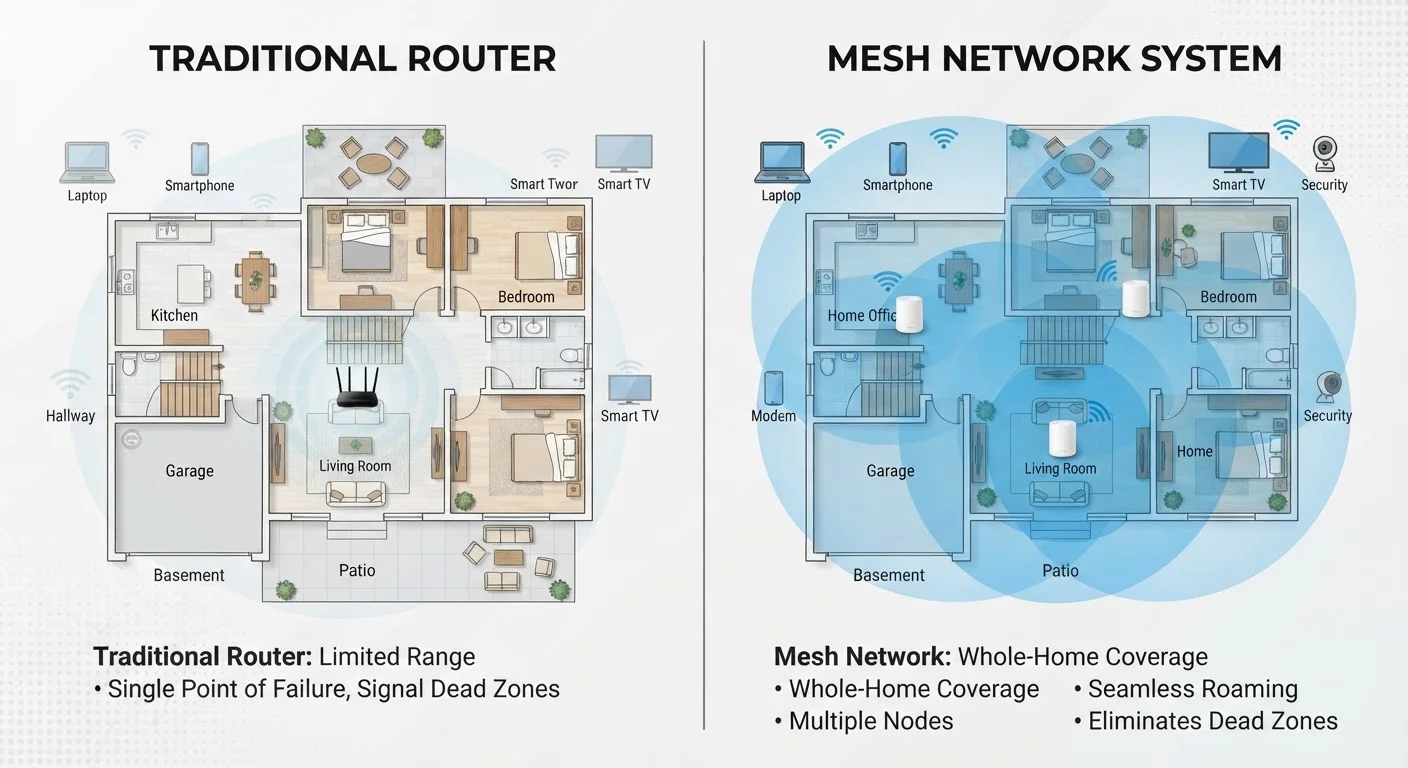
A traditional router is a single device that connects to your modem and broadcasts a Wi-Fi signal outward in all directions. It handles all traffic from every device on your network. Signal strength drops the farther you are from the router, and physical barriers - floors, concrete walls, large appliances - can weaken it further.
A mesh network replaces that single device with a system of two or more nodes (sometimes called satellites or access points) placed around your home. Each node communicates with the others, creating one unified network under a single Wi-Fi name. Your devices automatically connect to whichever node offers the strongest signal as you move through your home.
The key technical difference is that mesh nodes are designed to talk to each other intelligently, handing off your connection seamlessly. Traditional routers can be extended with range extenders, but those often create separate networks or introduce lag - they aren't as integrated as a true mesh system.
Coverage, Speed, and Reliability
For most apartments and homes under roughly 1,500 square feet with an open layout, a well-placed traditional router delivers perfectly adequate coverage. Placing it centrally - not tucked in a closet or corner - maximizes reach.
Larger homes, split-level layouts, older construction with plaster walls, or homes with many stories are where mesh networks earn their keep. Dead zones in back bedrooms, basements, or garages are common complaints that a single router simply can't solve well. Adding a mesh node in a problematic area is more effective than a plug-in extender because the node shares the same network identity and management system.
Speed is more nuanced. Mesh systems that use a dedicated wireless channel (called a backhaul) to communicate between nodes are faster and more stable than those sharing the same band your devices use. The fastest mesh setups use a wired Ethernet backhaul - meaning the nodes are physically connected by cables - which effectively eliminates the speed penalty of wireless node-to-node communication. When a wired connection makes sense is worth understanding before you invest in any setup.
| Traditional Router | Mesh Network | |
|---|---|---|
| Typical cost | $50-$200 | $150-$500+ |
| Best home size | Under 1,500 sq ft | 1,500 sq ft and above |
| Dead zone coverage | Limited without extenders | Strong with multiple nodes |
| Setup complexity | Simple, plug-and-play | Easy app-guided setup |
| Expandability | Limited; requires new hardware | Add nodes as needed |
| Device handoff while roaming | Manual or inconsistent | Seamless and automatic |
| Management app quality | Varies by brand | Generally polished and feature-rich |
Cost and Complexity
Traditional routers are significantly less expensive. A capable single-unit router typically costs between $50 and $200 depending on the Wi-Fi standard and features. Setup is straightforward: plug it into your modem, follow a short configuration, and you're online.
Mesh systems generally start around $150 to $200 for a two-node kit and can run much higher for tri-band or Wi-Fi 6E systems. The trade-off is scalability - you can add nodes later without replacing the whole system.
Check Your Router Placement First
Before purchasing a mesh system, try repositioning your existing router to a more central location in your home. Elevating it off the floor and keeping it away from thick walls or large metal objects can meaningfully improve coverage. Many dead zone problems are solved by placement alone, with no additional hardware needed.
Management apps for mesh systems tend to be more polished, offering easy parental controls, device prioritization, and network health dashboards. Traditional router interfaces vary widely, and some are notably less user-friendly. That said, simpler setups mean fewer things that can go wrong.
Once you've settled on a setup, locking it down is the next priority. See our guide to securing your home Wi-Fi network for practical steps to protect whichever system you choose.
Making the Right Call for Your Home
Start by honestly assessing your space. Walk through your home with your phone and check signal bars in the rooms you use most. If you have consistent coverage and your internet feels fast enough for streaming, video calls, and browsing, a traditional router is likely serving you fine.
If you regularly drop off in certain rooms, struggle with video calls near the edges of your home, or have a property over 2,500 square feet, a mesh system is worth the investment. The same applies if you have a detached garage, a basement office, or an outdoor area you want covered.
Also consider the number of devices in your household. Modern mesh systems are optimized to handle dozens of simultaneous connections - smart TVs, security cameras, phones, laptops, smart home gadgets - without degrading performance for any one device. If your household runs 20 or more connected devices, that load management alone can justify a mesh upgrade.
Neither system is a magic fix for a slow internet plan. No router or mesh system can deliver speeds faster than what your internet service provider supplies to your modem. Always verify your plan speed first before assuming hardware is the bottleneck.